Nov. 17, 2026
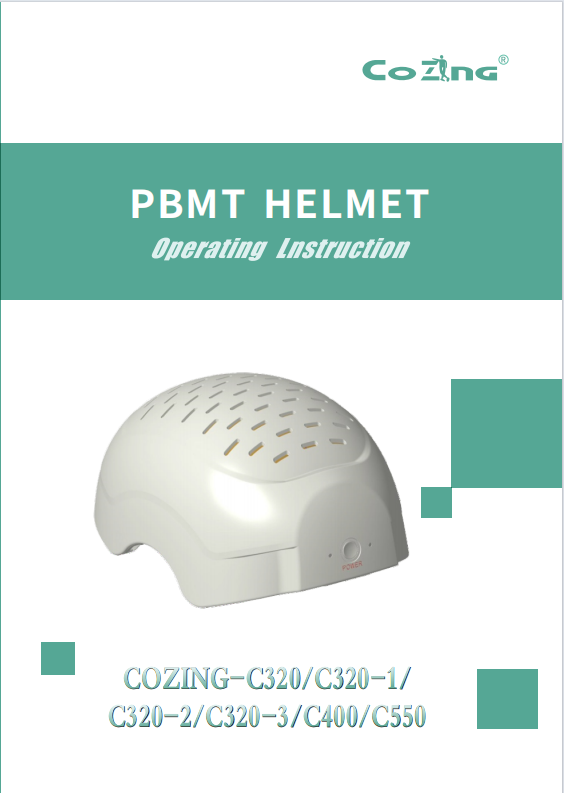
PBMT HELMET
Operating Instruction
COZING‑C320/C320‑1/ C320‑2/C320‑3/C400/C550
WUHAN COZING MEDICAL DEVICES CO.LTD
Thank you for choosing PBMT helmet. We are committed to providing you with high‑quality products that promote health and wellness. We are dedicated to ensuring your satisfaction with both the quality and performance of this product and strive to offer exceptional customer service. Our mission is to continue to explore innovative solutions for PBMT helmet, helping individuals achieve their optimal health.
I Product Description
design. brain rehab. Helmet is a personal‑use device that utilizes the principles and science of photobiomodulation (PBM) to stimulate brain healing. It delivers 810 nm near‑infrared light (NIR) through adjustable LED modules and a comfortable helmet.
The helmet's adjustable LED modules allow for targeted therapy of 12 specific areas affected by traumatic brain injury or brain diseases. The NIR light penetrates the scalp and stimulates cellular energy production, helping to reduce inflammation and regenerate damaged tissue.
therapy helmet is designed with user safety in mind. It features built‑in safety mechanisms to prevent overexposure to NIR light, and is designed for optimal comfort during extended use.
The helmet offers adjustable settings, including frequency and treatment time, to cater to individual needs. The device offers a combination of continuous and pulsed mode treatment, with pulse rates ranging from 1 to 20000 Hz.
II Therapeutic Indications for Use
Selection Guide
If your concern is:
Memory, Mood, Brain Fog -> Choose COZING‑C320 (810nm Cortical Activation Version)
Parkinson's, Movement Disorders, Deep Injury -> Choose COZING‑320‑1 (1050nm Deep Repair Version)
Both Cortex & Deep Regions Needed, Combined Issues -> Choose COZING‑C320‑2 (Balanced Dual‑Wavelength Version)
Mid‑to‑Late Stage Degenerative Disease, Maximum Energy Coverage Needed -> Choose COZING‑C400 (High‑Power Dual‑Wavelength Version)
Important Notes
Precautions:
Non‑Therapeutic Statement: This product is a photobiomodulation device designed to support cellular energy metabolism through specific wavelength irradiation. The described intended uses refer to health scenarios where the product may offer adjunctive support and do not replace medication or clinical treatment.
Individual Variation: Due to differences in individual constitution, age, and condition severity, results may vary. It is recommended to choose the appropriate model under the guidance of a physician.
Contraindications: Use with caution in pregnant women, individuals with photosensitive diseases, those taking photosensitizing medications, and those with acute eye diseases.
Model Core Parameters & Application
COZING‑C320: 320X810nm +24X660nm (Activation Wavelength)
·Mild Brain Injury Rehabilitation: Suitable for adjunctive rehabilitation of post‑injury.
COZING‑320‑1: 160X1050nm +24X660nm
·Parkinson, bradykinesia, Multiple Sclerosis.
COZING‑C320‑2:160X810nm +24X660nm, 1050nm Balanced Dual‑wavelength
·neuroplasticity after the acute phase of stroke or TBI (once condition is stable).
C400: 200X1050nm Full Coverage Wavelength
·Mid‑to‑Late Stage Neurodegenerative Diseases: Daily support for Alzheimer Parkinson's disease, helping delay cognitive and motor function.
III Instructions for Use
1. Power Connection
Use the original adapter (18V/3A) and Type‑C cable provided by our company.
Connect the adapter to a power socket, and connect the other end to the Type‑C interface on the helmet.
II. Selection and Control Mode
This product offers two control modes with different functions and permissions. Please choose according to your treatment needs:
Mode 1:Manual Mode (Full Unit On)
Power On: Long press the power key on the helmet for 3 seconds. The left status LED will stay on,and the right signal LED will flash green.
Start Treatment: Click the power key again. All lasers and LEDs will activate simultaneously for full‑head treatment.
Characteristics: Simple operation, but cannot select treatment area, frequency, or intensity;uses default settings.
Mode 2: Remote Mode (Zonal & Precise Control)
Preparation & Pairing (Critical Step):
Long press the helmet's power key for 3 seconds to power on.Ensure the right signal LED is flashing green.Long press the remote control's power key for 6 seconds to power it on.
After powering on, the remote control will automatically attempt to connect to the helmet. Please wait3‑6 seconds until you hear a "beep" prompt tone, indicating successful pairing between the remote and the helmet.
Important: During the pairing wait period, do not perform any operation on the remote control. Any button press may cause pairing failure.
Quick Operation Mode (First Interface after Successful Pairing):
After successful pairing, you will enter the Remote Control Main Interface (the first operation screen).In this interface, you can directly use the quick keys.
Quick Key Functions:
B1 Key: One‑touch access to beginner1 mode
B2 Key (BEGINNER): One‑touch access to beginner 2 mode
F Key:Enter Frequency Adjustment mode.
Short press >/<keys to increase or decrease by 1 Hz each time.
Long press >/< keys to increase or decrease by 10 Hz each time.
M Key: Toggle Output Mode. Press once for Pulse mode, press again to switch to Continuous mode,and so on.
Please Note: All quick keys (B1, B2, F, M) are only effective in the Remote Control Main Interface immediately after successful pairing. After entering other sub‑menus, you must return to the Main Interface to use them.
Standard Treatment Process:
Use the arrow keys to select the Treatment Zone (12 zones).Press OK to confirm.Set Time, Power Intensity,and other parameters sequentially, pressing OK to confirm each step.
Press the ok key to begin treatment.
Saving and Recalling Personal Protocols:
Saving a Personal Protocol:
While the laser is outputting, press the I key to enter the protocol storage interface.
Use the arrow keys to select an empty storage slot (e.g., PROTOCOL 1).
Press the S key. The screen will display "Saved", indicating that all current settings (including Zone,Time, Intensity, Frequency, Output Mode) have been successfully saved.
Recalling a Personal Protocol:
In the Remote Control Main Interface, press the I key.
Use the arrow keys to select a previously saved protocol (e.g., PROTOCOL 1).
Press the OK key to confirm. The device will automatically load all settings for that protocol. You just need to press the Start key to begin treatment.
Deleting a Personal Protocol:
In the Remote Control Main Interface, press the I key to enter the saved protocol list.
Use the arrow keys to select the erroneous or unwanted protocol you wish to delete.
Press the DEL key. The protocol will be deleted immediately.
III.End of Treatment
The device will power off automatically, or you can manually power it off by long‑pressing the power key.
Disconnect the power and store the device in a dry, cool place.
IV Technical Specifications
Treatment Zone Control Description
Treatment Zone Control:
Manual Mode: One‑touch start, all light sources work simultaneously for full‑ head coverage.
Remote Mode: Precisely select any single or multiple zones from 12 brain regions via the remote controller for targeted irradiation.Suitable for rehabilitation scenarios requiring focused intervention on specific brain areas (e.g., prefrontal cortex, motor area, temporal lobe, etc.).
Precautions
Note:All models must use the original adapter (15V/3A) and Type‑C cable. This product does not contain a built‑in lithium battery and must be connected to a power source during use.
For specific frequency recommendations, please refer to the [Phototherapy Frequency Guide].
Contraindications: Pregnant women, cancer patients, individuals with hemorrhagic diseases, photosensitive diseases, severe heart disease, etc.
【Maintenance and Storage】
Do not place the device in high temperature, humid, direct sunlight, strong magnetic fields, or near strong microwave fields.
Clean with a soft cloth. Do not use alcohol or chemical solvents.
Do not disassemble the device by yourself.
Store out of reach of children and pets.
【Package List】
main unit 1
power adapter 1
Technical Specifications Table
| Parameter | COZING‑C320 |
| --- | --- |
| Light Source Configuration | 320X810nm LED + 24X660nm LED |
| Total Output Power | Approx. 16.72W |
| Timer Range | 0‑30 minutes |
| Intensity Level | 1‑10 adjustable |
| Treatment Zones | Manual Mode: All zones selectable; Remote Mode: 12 zones |
| Power Supply | 15V/3A (Original adapter) |
| Environmental Condition | 5°C~40°C, Relative Humidity ≤80% |
V Cleaning Instructions
Use a soft cloth and mild cleaning solution to clean the helmet as needed.
Store the helmet in a cool, dry place when not in use.
Charge the battery as needed using the included charger.
VI Frequently Asked Questions(FAQ)
Q1:How long should I use the device each day?
A: The recommended session duration varies by model due to different wavelength configurations and target applications:
Once daily, 25‑35 minutes
Note:
Adaptation Phase: Allows the body to gradually acclimate to light stimulation; start with shorter durations.
Standard Phase: Recommended duration range to achieve clinically effective dosage.
Q2: Do I need to use it everyday? Are rest days necessary?
A: Yes, a cyclical usage schedule is recommended to allow the body adequate time for repair and adjustment.
Recommended Weekly Cycle: Use 5 days, rest 2 days
Long‑Term Use Recommendation:
For all models, after 4 weeks of continuous use, it is recommended to take 1 week off to maintain optimal efficacy and prevent cellular desensitization.
Q3:Are there different recommendations for specific health conditions?
A: Yes, based on your specific health condition, refer to the following adjusted protocols:
early TBI: Twice daily, 15 minutes per session (morning & afternoon)
Q4:What is the best time of day to use the device?
A: It is recommended to use the device before 4:00 PM. For sensitive individuals, evening use may affect sleep due to energy activation.
Optimal Use Time: Morning or early afternoon
Time to Avoid: Within 3‑4 hours before bedtime
Q5: What should I do if I experience discomfort?
A: A small number of sensitive individuals may experience the following reactions during initial use:
Unusual fatigue, drowsiness
Dizziness, mild headache
Difficulty sleeping
Recommended Action: Reduce usage time, ensure adequate rest.
Important: If discomfort persists or worsens, discontinue use and consult a physician.
Q6: How long will it take to see results?
A:The time to effect varies by wavelength and individual circumstances:
810nm Dominant Models (C320): Cognitive improvements may be noticed relatively quickly; some users report effects within 1‑2 weeks. It is recommended to use consistently for 4‑6 weeks to evaluate efficacy.
1050nm Dominant Models (320‑1): Deep repair mechanisms are slower.It is recommended to use consistently for 4‑8 weeks before evaluating improvements in motor function or deep symptoms.
Dual‑Wavelength Models (C320‑2, C400): Onset time varies depending on the primary symptoms,falling between the two ranges above.
Tip: The above recommendations are based on photobiomodulation academic literature and clinical practice. Usage may be adjusted within the recommended ranges based on individual response. For serious health conditions, please consult a doctor.
VII Disclaimer
Individual results may vary: The effectiveness of this treatment may vary from person to person. Improvement levels and response time may depend on factors such as the severity of the brain injury and individual health conditions.
Not a substitute for medical advice: This helmet is designed to complement medical treatment but should not be considered a substitute for professional medical advice,diagnosis, or treatment. Always follow your healthcare provider's recommendations.
VIII Warning Symbols
The operator must read,understand,and follow all instructions in the accompanying documents including all warnings, cautions, and precautions before use.
IX WARRANTY PROVISIONS
We provide you with Comprehensive pre‑sales and after‑sales consulting and maintenance services; The helmet from the date of purchase,non‑human damage warranty time is one year.
Mail:info@cozingmedical.com
Address: East Lake New Technology Development Area Wuhan, Hubei, China.
X WARRANTY PRODUCT CARDS
Our core value is to meet user's need as the starting point, so we are willing to provide you with Comprehensive pre‑sales and after‑sales consulting and maintenance services; The helmet from the date of purchase, non‑human damage warranty time is one year.
Mail: info@cozingmedical.com
Address: Building 8 No.8 Optical Valley, East Lake New Technology Development Area Wuhan, Hubei, China.
WARRANTY CARD(STUB)
Purchasing type:
Fuselage coding:
Date of purchasing:
Network of purchasing:
WARRANTY CARD(STUB)
Purchasing type:
Sales Unit:
Purchasing site:
Name of user:
Address:
Tel:
Main question:
I Product Description
design. brain rehab. Helmet is a personal‑use device that utilizes the principles and science of photobiomodulation (PBM) to stimulate brain healing. It delivers 810 nm near‑infrared light (NIR) through adjustable LED modules and a comfortable helmet.
The helmet's adjustable LED modules allow for targeted therapy of 12 specific areas affected by traumatic brain injury or brain diseases. The NIR light penetrates the scalp and stimulates cellular energy production, helping to reduce inflammation and regenerate damaged tissue.
therapy helmet is designed with user safety in mind. It features built‑in safety mechanisms to prevent overexposure to NIR light, and is designed for optimal comfort during extended use.
The helmet offers adjustable settings, including frequency and treatment time, to cater to individual needs. The device offers a combination of continuous and pulsed mode treatment, with pulse rates ranging from 1 to 20000 Hz.
II Therapeutic Indications for Use
Selection Guide
If your concern is:
Memory, Mood, Brain Fog -> Choose COZING‑C320 (810nm Cortical Activation Version)
Parkinson's, Movement Disorders, Deep Injury -> Choose COZING‑320‑1 (1050nm Deep Repair Version)
Both Cortex & Deep Regions Needed, Combined Issues -> Choose COZING‑C320‑2 (Balanced Dual‑Wavelength Version)
Mid‑to‑Late Stage Degenerative Disease, Maximum Energy Coverage Needed -> Choose COZING‑C400 (High‑Power Dual‑Wavelength Version)
Important Notes
Precautions:
Non‑Therapeutic Statement: This product is a photobiomodulation device designed to support cellular energy metabolism through specific wavelength irradiation. The described intended uses refer to health scenarios where the product may offer adjunctive support and do not replace medication or clinical treatment.
Individual Variation: Due to differences in individual constitution, age, and condition severity, results may vary. It is recommended to choose the appropriate model under the guidance of a physician.
Contraindications: Use with caution in pregnant women, individuals with photosensitive diseases, those taking photosensitizing medications, and those with acute eye diseases.
Model Core Parameters & Application
COZING‑C320: 320X810nm +24X660nm (Activation Wavelength)
·Mild Brain Injury Rehabilitation: Suitable for adjunctive rehabilitation of post‑injury.
COZING‑320‑1: 160X1050nm +24X660nm
·Parkinson, bradykinesia, Multiple Sclerosis.
COZING‑C320‑2:160X810nm +24X660nm, 1050nm Balanced Dual‑wavelength
·neuroplasticity after the acute phase of stroke or TBI (once condition is stable).
C400: 200X1050nm Full Coverage Wavelength
·Mid‑to‑Late Stage Neurodegenerative Diseases: Daily support for Alzheimer Parkinson's disease, helping delay cognitive and motor function.
III Instructions for Use
1. Power Connection
Use the original adapter (18V/3A) and Type‑C cable provided by our company.
Connect the adapter to a power socket, and connect the other end to the Type‑C interface on the helmet.
II. Selection and Control Mode
This product offers two control modes with different functions and permissions. Please choose according to your treatment needs:
Mode 1:Manual Mode (Full Unit On)
Power On: Long press the power key on the helmet for 3 seconds. The left status LED will stay on,and the right signal LED will flash green.
Start Treatment: Click the power key again. All lasers and LEDs will activate simultaneously for full‑head treatment.
Characteristics: Simple operation, but cannot select treatment area, frequency, or intensity;uses default settings.
Mode 2: Remote Mode (Zonal & Precise Control)
Preparation & Pairing (Critical Step):
Long press the helmet's power key for 3 seconds to power on.Ensure the right signal LED is flashing green.Long press the remote control's power key for 6 seconds to power it on.
After powering on, the remote control will automatically attempt to connect to the helmet. Please wait3‑6 seconds until you hear a "beep" prompt tone, indicating successful pairing between the remote and the helmet.
Important: During the pairing wait period, do not perform any operation on the remote control. Any button press may cause pairing failure.
Quick Operation Mode (First Interface after Successful Pairing):
After successful pairing, you will enter the Remote Control Main Interface (the first operation screen).In this interface, you can directly use the quick keys.
Quick Key Functions:
B1 Key: One‑touch access to beginner1 mode
B2 Key (BEGINNER): One‑touch access to beginner 2 mode
F Key:Enter Frequency Adjustment mode.
Short press >/<keys to increase or decrease by 1 Hz each time.
Long press >/< keys to increase or decrease by 10 Hz each time.
M Key: Toggle Output Mode. Press once for Pulse mode, press again to switch to Continuous mode,and so on.
Please Note: All quick keys (B1, B2, F, M) are only effective in the Remote Control Main Interface immediately after successful pairing. After entering other sub‑menus, you must return to the Main Interface to use them.
Standard Treatment Process:
Use the arrow keys to select the Treatment Zone (12 zones).Press OK to confirm.Set Time, Power Intensity,and other parameters sequentially, pressing OK to confirm each step.
Press the ok key to begin treatment.
Saving and Recalling Personal Protocols:
Saving a Personal Protocol:
While the laser is outputting, press the I key to enter the protocol storage interface.
Use the arrow keys to select an empty storage slot (e.g., PROTOCOL 1).
Press the S key. The screen will display "Saved", indicating that all current settings (including Zone,Time, Intensity, Frequency, Output Mode) have been successfully saved.
Recalling a Personal Protocol:
In the Remote Control Main Interface, press the I key.
Use the arrow keys to select a previously saved protocol (e.g., PROTOCOL 1).
Press the OK key to confirm. The device will automatically load all settings for that protocol. You just need to press the Start key to begin treatment.
Deleting a Personal Protocol:
In the Remote Control Main Interface, press the I key to enter the saved protocol list.
Use the arrow keys to select the erroneous or unwanted protocol you wish to delete.
Press the DEL key. The protocol will be deleted immediately.
III.End of Treatment
The device will power off automatically, or you can manually power it off by long‑pressing the power key.
Disconnect the power and store the device in a dry, cool place.
IV Technical Specifications
Treatment Zone Control Description
Treatment Zone Control:
Manual Mode: One‑touch start, all light sources work simultaneously for full‑ head coverage.
Remote Mode: Precisely select any single or multiple zones from 12 brain regions via the remote controller for targeted irradiation.Suitable for rehabilitation scenarios requiring focused intervention on specific brain areas (e.g., prefrontal cortex, motor area, temporal lobe, etc.).
Precautions
Note:All models must use the original adapter (15V/3A) and Type‑C cable. This product does not contain a built‑in lithium battery and must be connected to a power source during use.
For specific frequency recommendations, please refer to the [Phototherapy Frequency Guide].
Contraindications: Pregnant women, cancer patients, individuals with hemorrhagic diseases, photosensitive diseases, severe heart disease, etc.
【Maintenance and Storage】
Do not place the device in high temperature, humid, direct sunlight, strong magnetic fields, or near strong microwave fields.
Clean with a soft cloth. Do not use alcohol or chemical solvents.
Do not disassemble the device by yourself.
Store out of reach of children and pets.
V Cleaning Instructions
Use a soft cloth and mild cleaning solution to clean the helmet as needed.
Store the helmet in a cool, dry place when not in use.
Charge the battery as needed using the included charger.
 COZING-C400 MANUAL BOOK.pdf